How a database in my homelab quietly got corrupted — and how a recovery that would have taken days in the past became a quick, straightforward conversation.
I run a homelab — a (not so) small set of real and virtual machines at home that runs a lot of services you would normally rent from a cloud provider: storage (like Dropbox), photo management (like Google Photos), a media server, and a lot more. Self-hosting is a hobby, and like most hobbies, it is to equal parts useful and self-inflicted.
But: I don’t run it entirely by hand anymore. I wired in Claude (Anthropic’s AI) into my setup through a deliberately narrow path I built myself. Claude cannot simply log into my machines and start changing things. It reaches them through a chain I control: via a chat with Claude on my laptop, then the host server, then into one specific container as a non-root user, behind a small gateway that restricts which commands are allowed to get through. Anything with bigger consequences waits for me to explicitly give a “go”.
That constraint is the point, and it’s worth keeping in mind. This is not an “I asked an AI to fix my server and walked away” situation. It is closer to working with a very fast, very thorough colleague who handles the tedious parts on their own but checks with me before doing anything that can’t be reversed. (If you want technical details of that “narrow path” — SSH chain, command-filtering gateway, signed Git channel — you can find them in the P.S. at the end.)
I went to log in to one of my background services via my browser. The login page loaded normally. I entered my password, and instead of getting in, I got this:
Value cannot be null. (Parameter 'serviceType')That is a runtime error from somewhere deep inside the application, and… it is not helpful. It tells you something is missing, but gives no specific details on what or why. The service had worked untouched for months or even years. But now it did not.
I pasted the error to Claude, and we started to take a closer look.
The first explanation made sense: The error surfaces in the authentication code (the page loads, but submitting credentials fails), and it fails the same way even in an incognito browser window. So it is happening on the server side, not in my browser. Most likely, the authentication setup had somehow gotten into a bad state.
The easiest solution for “bad state” is… a restart. Claude restarted the service. It changed nothing. Bummer.
This is exactly the point where, in the past, I tend to lose an hour: having a plausible theory, no confirmation, and a lot of effort spent on the wrong problem.
What I find genuinely interesting is to watch how Claude works through a moment like this — the point where it stops trusting the obvious explanation and decides to go looking for actual evidence instead.
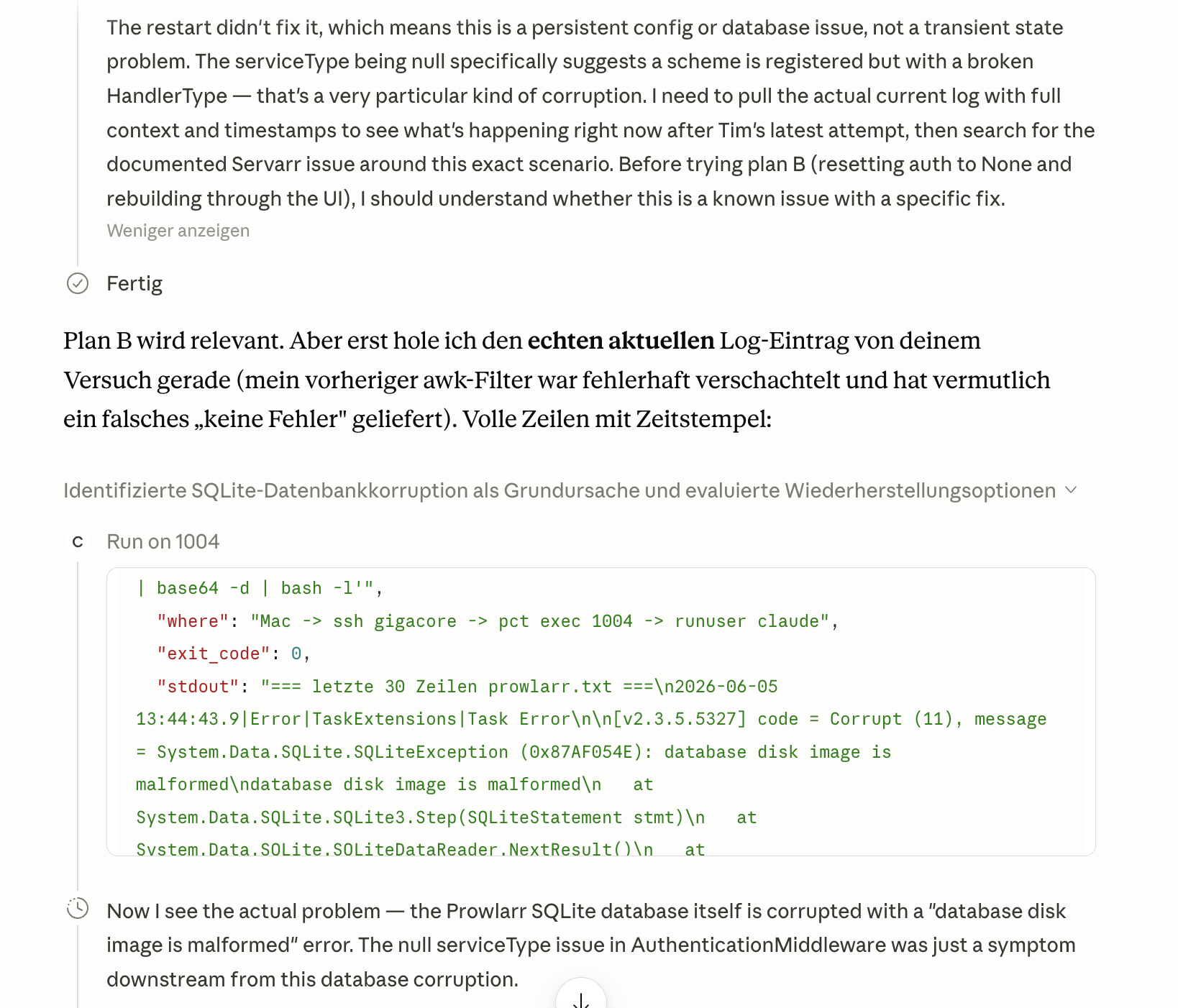
Instead of reaching for the next plausible fix, Claude pulled the service’s logfile through the bridge and extracted what was happening underneath the authentication problem:
database disk image is malformedOuch! The login error was just a symptom. The authentication code was trying to read my account from the database, but the database was structurally damaged. Then the failure surfaced on a higher layer as that cryptic message. A quick integrity check by Claude confirmed a genuine corruption in the database’s internal structure. Not a configuration problem, not a bad password — the database file itself was b0rked.
This shift is important: rather than continuing to guess, Claude started digging and got the evidence on its own, and the evidence pointed to somewhere completely different.
A few days earlier, I migrated most of my containers/virtual machines onto a new server. The migration went well… except that this kind of database (SQLite) is really not forgiving about being stopped mid-write. A shutdown during the move, which was not perfectly clean, was almost certainly the cause.
Good news: my “heavier” databases (the ones with proper crash recovery) had come through the migration without any problems. It was specifically the small embedded ones that were exposed, which led straight to the follow-up question forming in my mind.
Before I could even get to it, Claude had already raised the question by itself: if one database had been corrupted by that shutdown, others might have too, and it proposed checking all of them.
This is what really impressed me — Claude was not waiting for me, asking “could this be a wider issue?”, but it had already put that on the list. And the suggested method was neat: all of my containers share a single underlying storage mount, so one small throwaway container, pointed at that shared storage (created by Claude without any action on my end), could run a read-only integrity check across every database of this type in my entire setup in a single pass.
The sweep was quick and came back with a clear result: Out of dozens of databases, exactly three were corrupted: the service I had started with, plus both instances of another app. Everything else (including a 2.5 GB database I would have bet was fragile) came back clean.
Then a second unprompted catch: Claude pointed out that the databases of my media server were not covered by that sweep, because they live on a different storage path. It flagged the gap to check separately rather than quietly leaving it out. And this one had one additional specialty — more about that later.
The good news is that most of these apps quietly keep their own scheduled backups — a small weekly snapshot in their config folder. So I did not need to touch my off-site backup system at all.
Here, the above-mentioned way of working together with Claude showed its strengths: For the “mechanical” parts, Claude took over and simply did them: it located the most recent backup for each affected service (from before the migration) and verified that each backup itself passed an integrity check before trusting it. On a temporarily created container, it extracted the backups to run its checks (again: all without any action from my side). In the end, there is no point in replacing one corrupted database with another. 😀
But for the decisions that actually mattered, it stopped and asked. It laid out the different recovery options with their trade-offs (restore from a clean backup, trying to fix the corrupted file, …) and let me choose. Due to different reasons, I picked the restore path. Every step with connected consequences (stopping a service, swapping a database file, and later deleting anything) was proposed first and then waited for my explicit “go”.
The restore itself was the same routine for each service: stop it, move the corrupted database (renamed, not deleted — I wanted to keep them because you never know…), drop in the verified clean backup, fix file ownership so the app can read it, start it again, and confirm the database is now healthy.
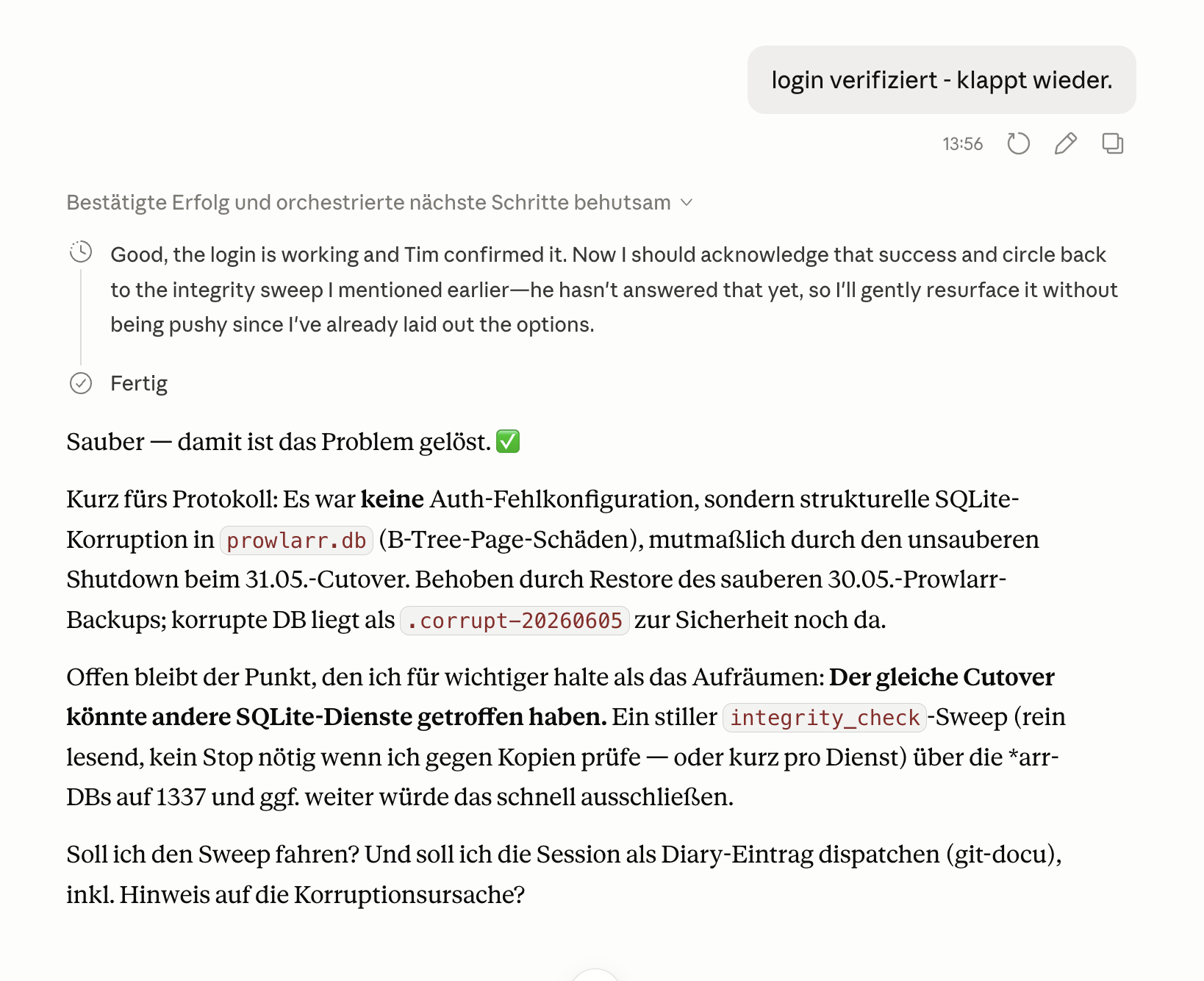
I logged in, and it worked.
This is the question that keeps me up at night. Not the fixing itself, but not knowing if I missed anything. Restoring a backup from before the migration (several days earlier!) means anything added since then is gone.
Again, I did not need to ask — Claude checked proactively by itself. The corrupted databases were damaged but still partly readable, so it queried the old, broken database directly and extracted exactly what had been added after the backup date.
In the end, there were only two entries in one service and none in the other — and on a closer look, those two were only placeholders with nothing attached to them yet. Nothing of substance was lost. Claude recreated the two placeholders, with their original settings, and that was that.
Being able to get a precise answer to the question “what exactly was added after this date?” out of a database that is actively failing… was genuinely calming and avoided sleepless nights for me. 😅
Back to the media server. We checked its databases too, as it also went through the same migration. But there was a twist: it ships its own customized version of the database engine, and standard tools simply can not read its files — they fail on a custom extension it relies on. You can only check it with the specific tools bundled with the server.
Claude recognised that from the error message, instead of concluding (wrongly) that the database was broken. It switched to the correct tool and confirmed that both of its multi-gigabyte databases were clean. On my own, I would have spent hours chasing this false alarm.
Every meaningful session in my homelab ends the same way. Claude creates a dated entry in my documentation repository, committed to my Git server — so that in ~10 months from now, I have a good way of remembering what happened and why. So also for this session, Claude wrote up the incident: the root cause, which services were affected, where the restores came from, the quirk with the media server, … and a note to my future self to please stop containers cleanly before the next migration.
This specific session with Claude did impress me. Heck, it even made me write this post. 😬

But let me be more specific about what this was: It was not “AI magic”.
Nothing was fixed with me having no idea what was going on. Every action with consequences (service restarts, database swaps, deletions) waited for my approval, because that is how I codified it in the bridge. The useful behaviour was more subtle than “Claude fixed my server”:
In the past, I would have spent hours on the wrong theory, an evening finding out the right one, dozens of forum searches for several similar database problems, nervous comparison of backup dates, and definitely the question “did I lose any data?” following me to bed. Now all of this was compressed to a short, methodical conversation — symptom, identification of the cause, a check across all my containers, verified restores, the confirmation that nothing was lost, and afterwards documentation of the incident.
What used to cost me a lot of time and nerves now was… quite easy. Not because something did my thinking for me, but because the tedious, methodical part of the work ran in parallel with my judgment instead of competing with it.
That turns out to be a very good way to work.
If you run a homelab: stop your containers cleanly before you move them — embedded databases do not forgive a hard stop. And keep your backups, …
…you do have backups, have you?!
Since the whole story leans on this “narrow path”, here is the bridge in a little more detail. The design goal is simple: let Claude do real work on my machines, while keeping the worst-case blast radius as small as I possibly can.
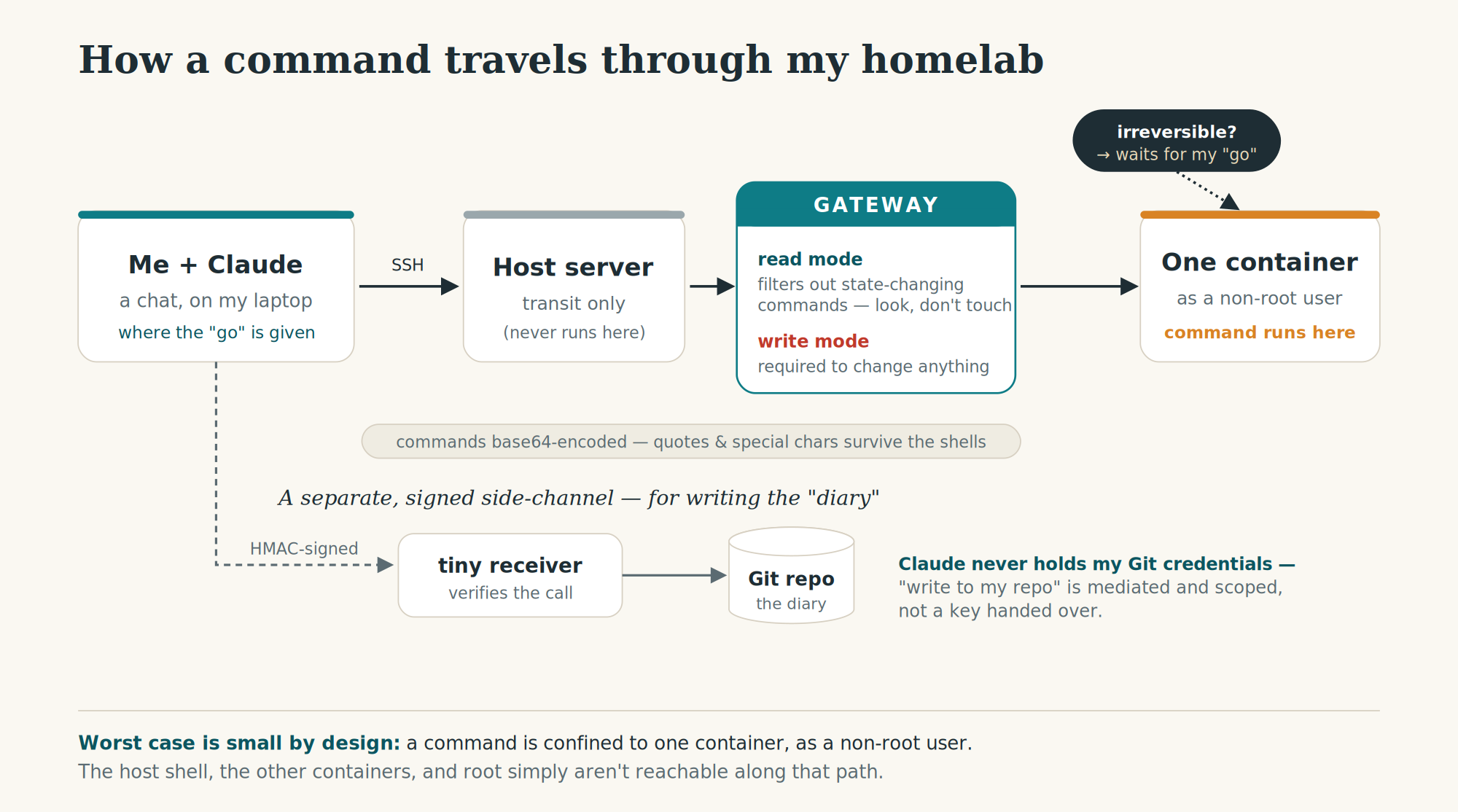
When Claude runs a command, it always travels down the same fixed chain. From the chat, it goes out over SSH to the host, then uses the host’s container tooling to step into exactly one specific container — never the host itself — and there it drops to a normal, non-root user before anything actually runs. So even in the worst case, a command is confined to a single container as an unprivileged user. The host, the other containers, and root are simply not reachable along that path.
In front of that sits a small gateway with two modes. In read mode, it actively filters the command: anything that could change state (container commands, mounts, output redirection, …) is stripped out, so a “just have a look” request can’t mutate anything. Changing something at all requires write mode, on purpose — even read-only container inspection has to be run explicitly in write mode. Sometimes paranoid by design is a good choice.
Commands are base64-encoded for the trip through the chain. That sounds fancy, but in reality is basic work: it keeps quotes, spaces, and special characters from being mangled as they pass through several shells along the way. (Anyone who has ever fought with nested quoting over SSH knows exactly the pain this avoids…)
Writing to my documentation Git repository (the “diary” entry at the very end) goes through a separate path again: Claude does not hold my Git credentials. Instead, it hands the task to a tiny receiver via an HMAC-signed request (so the receiver can verify that the call is legitimate), and a constrained helper does the actual commit and push. This ensures that “write to my repo” is a mediated and scoped step, not a key handed over to Claude.
On top of all of that sits the “human gate”: anything irreversible is proposed first and then waits for my explicit “go”. While the filtering and the confinement reduce what can go wrong, the “go” keeps the judgment on my end.
Dieser Beitrag erschien ursprünglich am 6. Juni 2026 auf Medium: A cryptic login error, a corrupted database, and the smoothest recovery I’ve ever done.


23. Juni 2026 um 23:37 Uhr
[…] A cryptic login error, a corrupted database, and the smoothest recovery I’ve ever done […]